Skip to content
Native macOS · local-first

Your AI staff for engineering management.

Talk to one chief of staff. Sage triages every message, summons only the specialists it needs, and answers back in a single voice. They share one memory, one roster of your people, and your writing voice — all on your own Mac.

No account, no sign-up Nothing leaves your machine ~80MB download

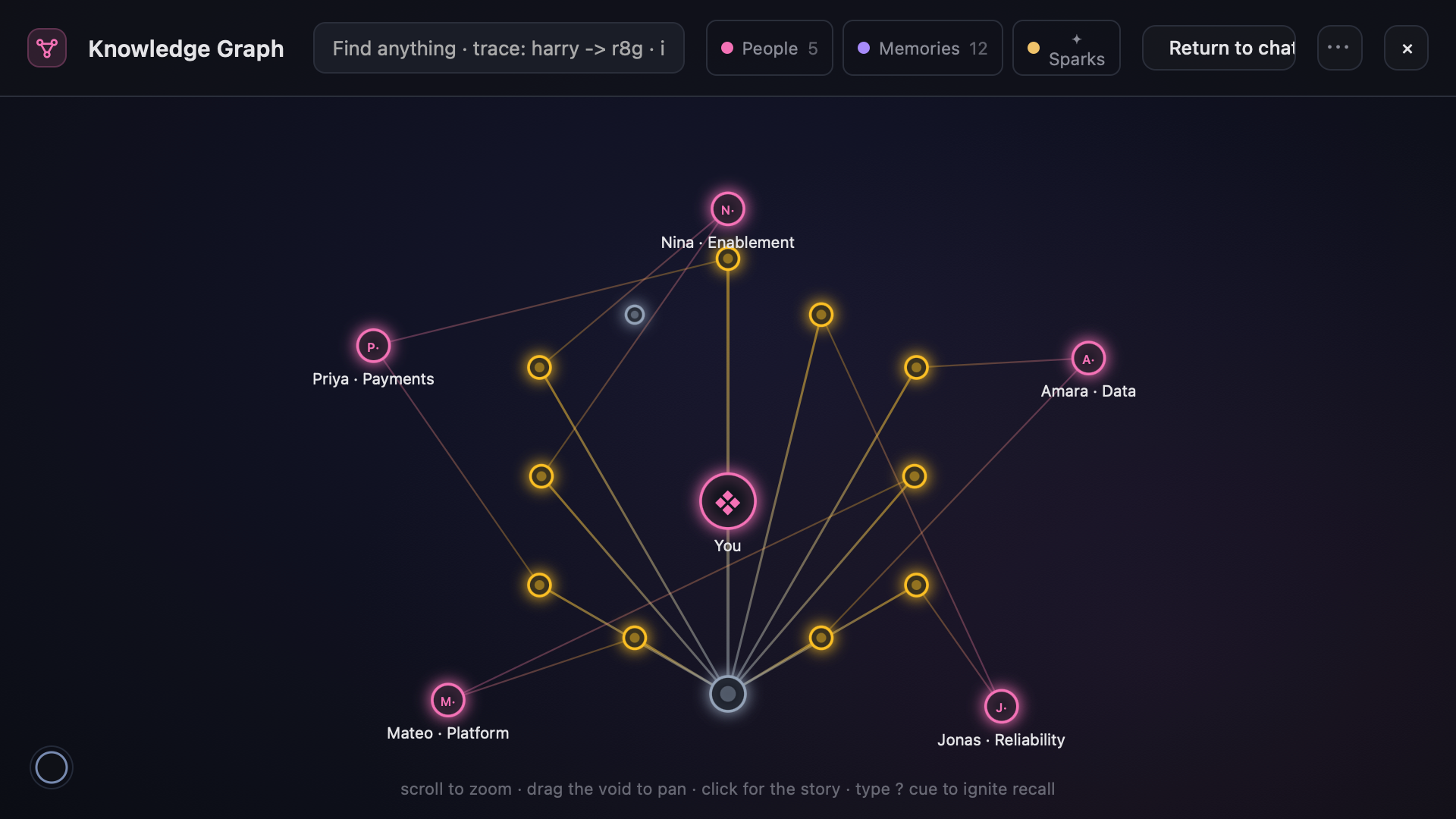
Spreading activation. Recall lights up a multi-hop path.

The context tax

An EM’s real job is assembling context.

Every answer lives in a different tab. The stitching is paid for, all day, by the most expensive people on the team.

To answer one question — “are we on track for the migration, and who’s overloaded?” — you open:

Jira GitHub Chronosphere DX three 1:1 notes Slack
“You weren’t hired to be a switchboard between dashboards.”

Generic assistants don’t fix this. They have no memory of your team, no access to your real signals, and no idea who anyone is. Zimac is built to hold that world for you.

“Are we on track for the migration, and who’s overloaded?”

One question. One answer. Zimac reads the signals, knows your people, remembers the last three conversations, and replies in one synthesized voice — instead of leaving the assembly to you.

The core mechanic

One agent. The right team, quietly.

You feel like you talked to a chief of staff — not a switchboard. Sage routes spanning questions to several specialists at once and folds their work into a single reply.

1

Triage

Sage reads every message and decides what it actually needs — one domain, several, or none at all.

2

Route

Sage summons only the specialists the question touches. The rest stay benched — not loaded into the call, so you don’t pay for a team you didn’t need.

3

Synthesize

Their findings come back as one answer, in one voice — grounded in a shared memory, a shared roster of people, and the way you write.

The roster

Eight specialists. One shared mind.

Sage, Quill, Joy and Cody are on by default. The rest stay benched until a question summons them — and you can add your own for whatever your stack needs.

Always on On by default Benched until summoned Sage is always on — it can’t be benched.
The living substrate

A better connection, not a bigger model.

Zimac is engineered like a connectome, not a chat log. The memory is a real, navigable graph — and it learns the shape of how you think.

Engram memory log

An append-only, length-prefixed log protected by CRC32 and a hash chain. Appends are O(1) and crash-safe; it tolerates a torn write and auto-recovers from backup. Your memory survives a power cut mid-write.

Hypergraph

People, notes, docs and links are cross-linked through shared topics, with near-duplicate detection. Stays navigable past 100k+ items.

Spreading activation

Recalling one memory lights up a multi-hop constellation of related context — sub-millisecond, zero tokens — split into fact versus hedged.

Synaptic plasticity

Learned per-pair weights: ties that co-recall strengthen (Hebbian), and fade over about 21 days. Zimac literally learns how you think over time.

Emergent edges

When ideas keep co-firing, Zimac mints an association nobody authored — surfaced only as a hedged “pattern noticed,” never as fact.

Voice fingerprint

A measured fingerprint of your own writing — your em-dash habits, your filler, your cadence — constrains every draft so it sounds like you, not like a generic assistant.

The workspaces

It’s a workspace, not a chat box.

Each studio is a full screen. The conversation is one door; behind it are the timelines, plans, boards and graphs your team actually lives in.

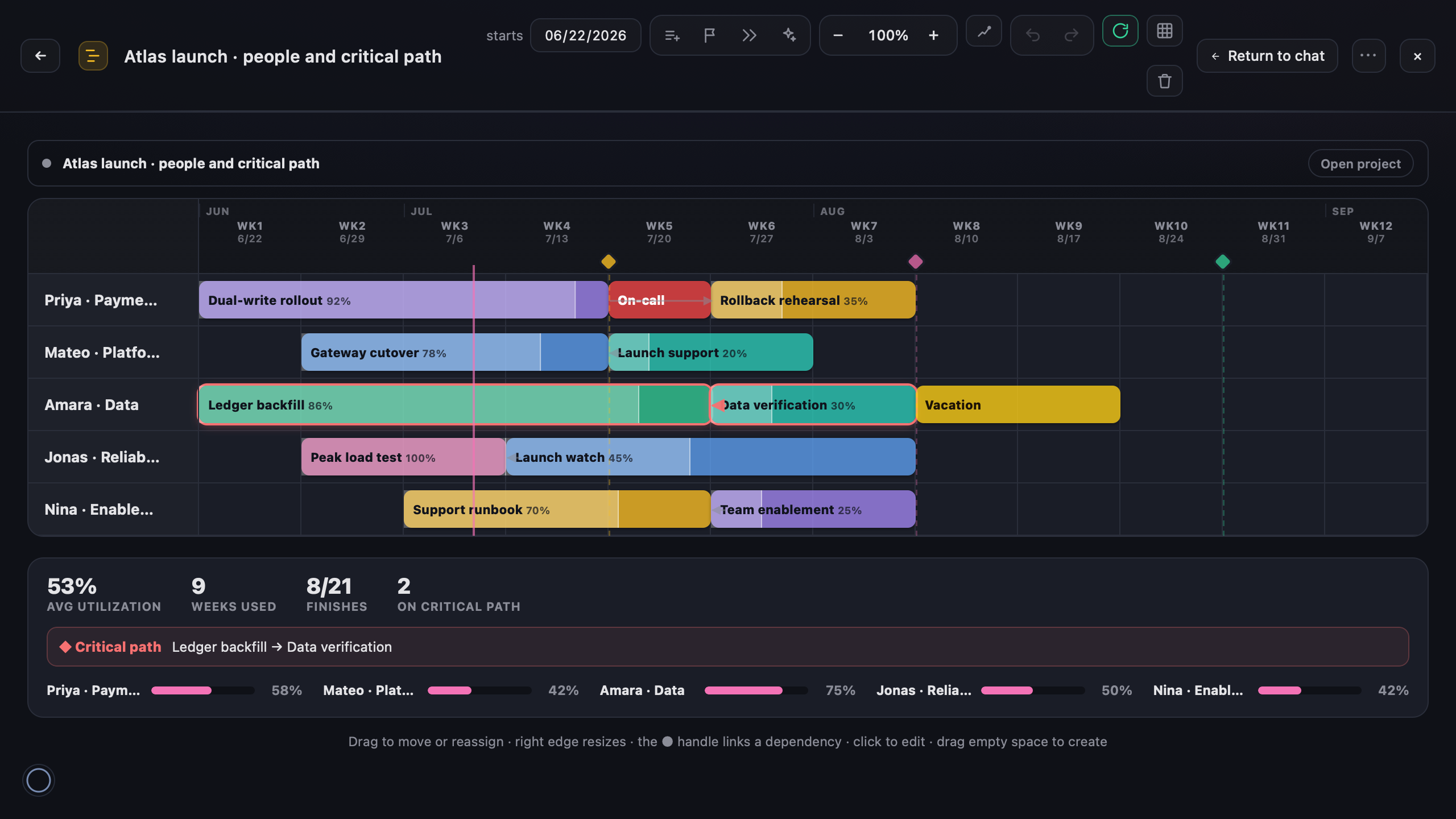
Gantt staffing plans

Drag a block. It deconflicts itself.

One row per person; blocks span weeks tagged work, on-call or vacation. Drag a block and Zimac auto-deconflicts so nobody’s double-booked. Tidy repacks, +4 wks extends, Copy for Sheets exports.

One button — Make a project — turns a plan into a tracked project: work blocks become end-of-week milestones on your board. Plan and project stay linked and reconcile block-by-block.

Projects

Your initiatives as a living timeline.

Sage clusters dated items into named initiatives, drawn as glowing lanes with draggable orbs. Built to be corrected: each suggested project arrives as a question you confirm (✓) or dismiss (×).

Confirmed and hand-made projects are locked from re-maps. Each one infers a lead and contributors — every name with a one-line “why”.

Dashboards

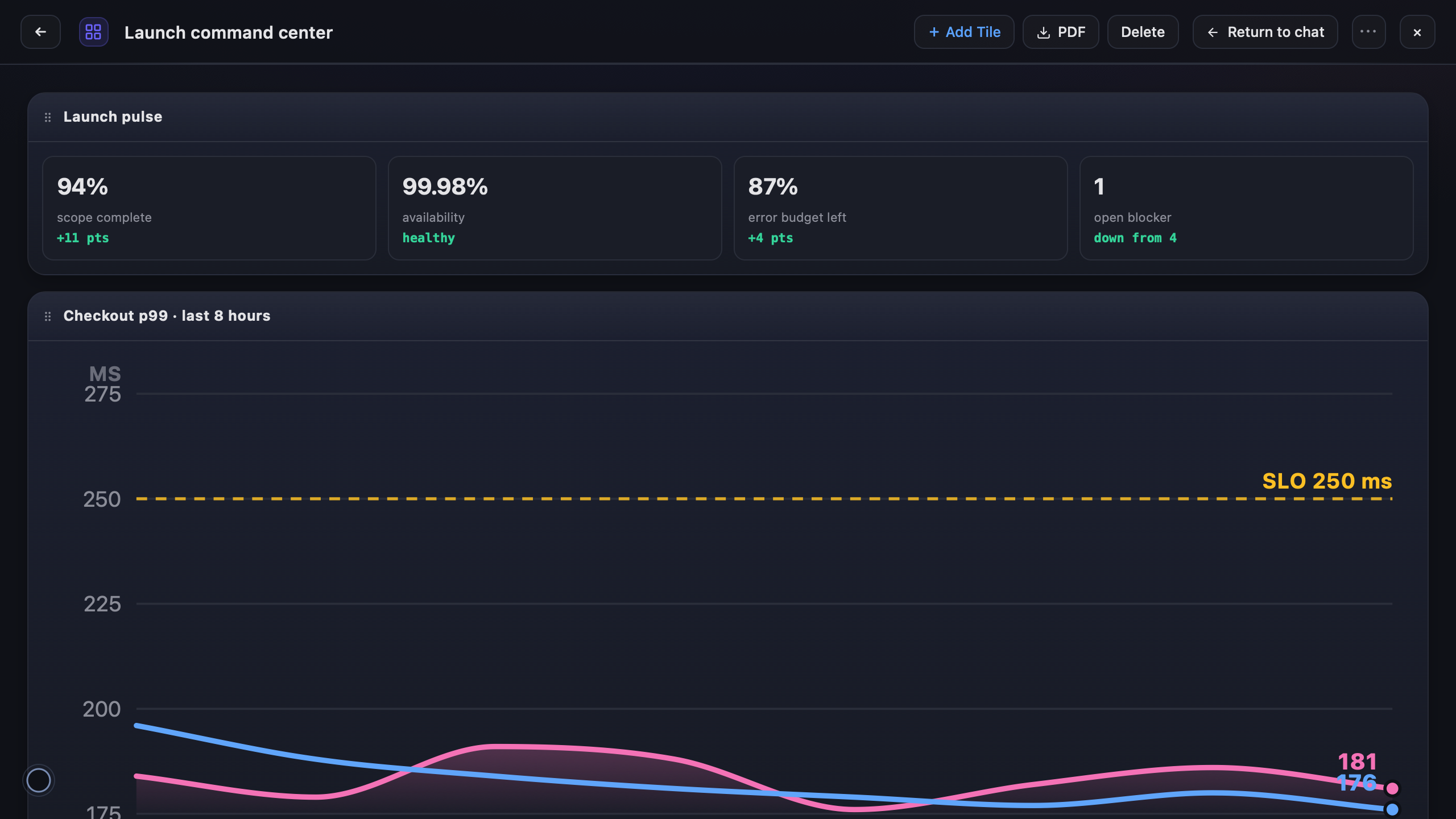
Pin a chart. It refreshes for free.

Pin any chart a specialist draws into a standing board. Tiles remember their input and refresh at zero token cost — stateless compute that never bills the model.

A board can never quietly run up a bill, because refresh isn’t bound to an agent at all.

Knowledge Graph

People, notes and docs as one graph.

Everything Zimac knows — people, notes, docs and links — as a single cross-linked, traversable graph. Follow a thread from a person to a decision to the doc that drove it.

Finder

Find a note and see how it connects — every tie explained in plain language. Token-free; no model call to search.

Review Studio

Paste a doc; get margin comments from each specialist’s lens, and rewrite flagged sections in your voice.

Mail

Drag .eml / .mbox files in and Zimac reads them into the knowledge base. Read-first: it never connects to your account or controls Apple Mail.

Chat

The conversation with Sage and the team — the front door to everything else.

Command palette

Jump across people, memory, docs, chats and live data pulls from anywhere in the app.

⌘K
Live signals

Grounded in your real systems.

Not guesses. Each integration is optional and lights up exactly one specialist when you add it — the dot is that specialist’s color.

GitHub code, PRs, commits · read-only · Cody Chronosphere PromQL production metrics · Cody DX engineering delivery metrics · Joy Wiz cloud cost & security · Finn Jira tickets & sprints · Sage Vertex AI Search company knowledge base · Quill
Engineered cost

Cheap by construction, not by hope.

Several independent layers keep spend down — and Zimac never spends a cent on your behalf until you decide it should.

A cheap front door

Every message hits a gate first. When in doubt, it routes up — never down.

“Thanks, that’s perfect!” → canned reply, no API call
“Fix the grammar in this.” → one small pass
“Are we on track for the migration?” → real work

Benched specialists

You pay for the team you summon, not the whole roster. Specialists you don’t need are never loaded into the call.

Burn-rate-aware downgrades

It reads your budget, projects spend to the reset date, and suggests stepping down a tier only if you’re on pace to overshoot and a cheaper tier is actually available. Never a blind downgrade.

Central LiteLLM proxy

Routes through your company’s LiteLLM proxy (Claude on Vertex) for central visibility, per-key virtual budgets and rate limits. The default model is Sonnet.

The Night Shift

An optional, token-frugal watcher.

It re-checks a small watchlist on a timer and taps you on the shoulder only when a value materially changes.

0 tokens Deterministic hashing senses the watchlist
A real change escalates to
1 call exactly one small model call
bounded by a per-key cooldown and a daily budget

Off by default · spends nothing until you flip the switch.

Privacy & security

Local by default. Hardened in depth.

Your data lives as plain files under ~/Documents/Zimac. Nothing leaves your machine except the model calls themselves.

Keychain secrets

Secrets live in the macOS Keychain, encrypted at rest. The .env holds only non-secret config, owner-only (chmod 600), kept outside iCloud sync — a stolen disk or errant sync exposes no keys.

Binds to localhost

The server binds to 127.0.0.1 only. There is no account, no sign-up, and no server-side copy of your data.

Injection defense

A standing directive treats retrieved content as data, not instructions. wrapUntrusted() fences every external result with provenance markers and size caps; redactSecrets() scrubs live secret values from anything heading to the model or logs.

Cards you act on

Consequential actions — drafts, meetings, schedule changes, memory edits — surface as cards you must act on. They never fire silently. The agent proposes; you dispose.

Durable by design

Atomic temp→fsync→rename writes with CRC checks everywhere. Automatic gzip GFS backups are written outside iCloud, with verify and restore.

Built to be vended

Shared infrastructure is a sensible default; anything personal — names, chats, memory, profiles — is per-user and never bundled when you hand Zimac to a coworker.

Get Zimac

Two steps, then your key.

A native Mac app. The only required credential is a LiteLLM API key — every other integration is optional and lights up one specialist when you add it.

Drag to Applications

Open Zimac.dmg and drag Zimac into /Applications.

Paste your key

On first launch, an onboarding flow asks for your LiteLLM key (required) plus optional GitHub and DX tokens. In-app hints point to where each one lives.

Required: a LiteLLM API key. Everything else is optional — add a token and the matching specialist comes online.

New to it? The how-to guide walks through every credential and the built-in diagnostics panel.

Stop being the glue. Start being the lead.

Let one chief of staff hold your world — the people, the signals, the memory — so the most expensive hours on your team go to judgment, not stitching.

Download for Mac